

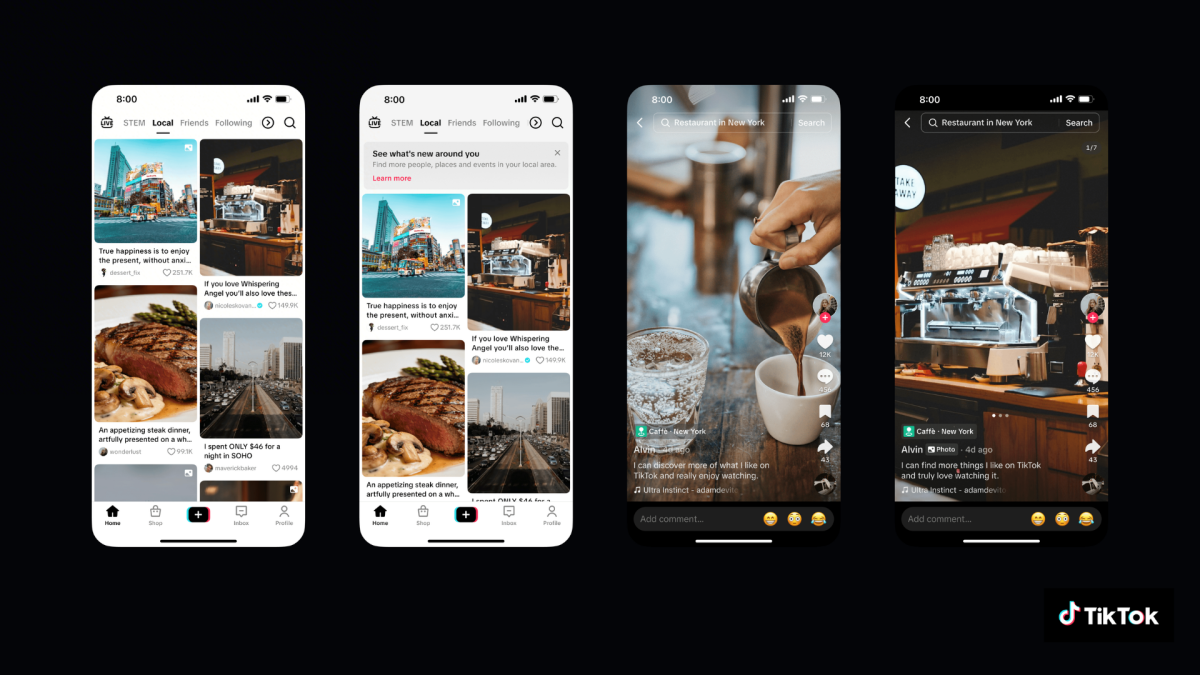
It hasn’t been a month since the U.S. arm of TikTok came under new ownership, and already American users are getting an exclusive feature. In a surprise move, the app today introduced a new “Local Feed” specific to U.S. users, ostensibly aimed at helping Americans see content from their immediate area. Technically, it’s similar to the “Nearby Feed” that was introduced in the U.K. and Europe in December, though this specific iteration might differ in the minor details, like the name, and more importantly, which data it accesses. Specifically, the company wants access to your GPS data to power the Local Feed, but it’s not making it transparent how exactly it will be used.
TikTok’s new Local Feed
TikTok announced its Local Feed today, and it has already popped up in my app without the need for an update. It’s located to the left of the Following feed, and tapping on it brings you to a scrollable list of posts rather than the usual “swipe-to-navigate” autoplaying videos. TikTok says that the feed is “designed to help you discover and connect with content, businesses, and services wherever you are,” and yeah, what I saw was mostly restaurant recommendations for New York City.
It’s worth noting that I was already occasionally getting these recommendations on my For You feed, and when I go on vacation, these posts usually change to match wherever I’m staying. So the app’s algorithm did already take location into account, however it got that information (more on that later). But the Local Feed allows you to choose when to see those posts, instead of waiting for the For You feed to show them to you. (Note that while it does originally display as a scrollable list, hopping into a video will allow you to swipe through the feed as usual.)
How to see the Local Feed on your TikTok account
The Local Feed showed up for me automatically when I opened my app today, but TikTok says there are a few situations where you might not see it, or if you do see it, where it might not show any content. For instance, accounts belonging to users under 18 supposedly won’t see content in their Local Feed, and neither will private accounts, or accounts where post privacy is set to Friends or Only You.
It’s unclear how the Local Feed uses your GPS data
Credit: Michelle Ehrhardt
Maybe most concerning in TikTok’s new announcement is a disclaimer towards the bottom of the post, explaining that TikTok will use your GPS location to help power the Local Feed. The company says this feature is off by default, entirely optional, and only available to accounts for users who are 18 or older. Still, I have a few quibbles.
First, it’s difficult to know where to adjust these permissions, because they’re not located in the TikTok app. Instead, they rely on your device settings. On iPhone, that’s under Settings > Privacy & Security > Location Services, while the exact steps will vary among Android phones. In device settings, you can see which apps have access to your location, and tap on them to restrict access. This differs from previous TikTok app, which allowed you to access your Location Services settings from within the app itself; that button no longer appears for me on the Settings and privacy > Privacy page despite it being shown there in Europe’s Nearby Feed announcement. It’s still mentioned on TikTok support pages, and I’ve reached out to TikTok for clarification as to what happened to it.
What do you think so far?
My bigger question is this: While TikTok was not listed among the apps in my device’s Location Services settings, I still had access to locally pinpointed content within the Local Feed, and it was still able load new content upon refreshing the feed and even restarting the app. This persisted even after I had turned off Location Services on my device entirely, and perhaps more concerningly, even after I switched to a private account, which TikTok said should not see content in the Local Feed. I’ve reached out to TikTok for clarification on this.
There are a few possible answers to these questions. The first is that it’s possible that even after I disabled my location or took my account private, the Local Feed continued to refresh using data it had already collected before I made those changes. As for why I couldn’t find the location services button in its usual location under the settings tab, that might be related to the app’s new Privacy Policy, which now gives it permission to gather your “precise location” so long as you have location services turned on for your device—bypassing the need for a separate toggle within the app.
To be fair to TikTok, all of this information would have been accessible to the app even before the Local Feed made its debut, but the Local Feed does make it a bit more obvious that TikTok knows where you are. That said, your location is supposedly only tracked when the app is in active use.
