

New Year’s Eve is my favorite holiday. I love a designated time to look forward and to reflect back, ideally while getting tipsy with friends. The turn of a new year is also a time when I’m grateful for my habit of writing down every little thing—and I don’t just mean getting my thoughts and feelings down in a journal. I’m talking about tracking every book read, every mile run, and every beer crushed (approximately). So if you’re interested in documenting your life—and you should be!—I highly recommend using a wonderfully detailed spreadsheet.
I’m not talking about bullet journaling (which can be cool, but which I find too artistically daunting). I simply create a Google sheet full of different color-coded tabs so that I can track any number of ways to measure a year. From the most thorough travel plans to your fitness journey, if you have a goal, that goal needs a spreadsheet tab.
It’s a fun, slightly nerdy technique that helps me visualize my life in a way that traditional journaling can’t. Here’s why I think this year, you should start your own spreadsheet to track all the little things in your life.
How to turn anything into a trackable achievement
The spreadsheet journal is perfect for us freaks who like to combine sentimentalism with statistics. Whatever metrics you choose to jot down, you can frame them around a sense of accomplishment. Your smart watch can track how many steps you’ve taken. A spreadsheet journal, however, is where you can appreciate how many steps you’ve achieved. From there, you can have fun with the numbers, converting those steps into miles or finding patterns over time or in whatever suits your nerdy brain.
Go wild. Create different tabs dedicated to different areas of your life, so you can appreciate how much you have going on. I’ll throw around some ideas below, but at the end of the day, this technique is really about recognizing the value in every little number that defines your life. It sounds counterintuitive, but please, don’t get too caught up in the details.
The core philosophy: track everything, judge nothing
The foundation of my system comes down to three main principles:
Radical honesty without shame. Every entry is data, not a judgment. Missed a week of workouts? Log it. The spreadsheet reveals patterns—maybe you always skip exercise when work gets stressful—which lets you plan around obstacles instead of feeling guilty about them.
Micro-goals over macro-dreams. Break each resolution into the smallest possible action. “Write a book” becomes “write 250 words daily.” These micro-goals are easy to track, hard to rationalize away, and create momentum through small wins.
Weekly reviews, monthly adjustments. You’ll spend 10 minutes every Sunday reviewing your data and 30 minutes at month’s end analyzing trends and tweaking your approach. This prevents the “check back in December” trap where you discover too late that nothing worked.
How to create your own tracking spreadsheet
First things first: Choose your spreadsheet software. I opt for the ease of Google Sheets, but I understand you might have some privacy concerns there. Or maybe you’re simply a master at Excel. The main takeaway is to create one master file with as many different tabs as you see fit. Include tabs tracking your health/fitness goals, books/movies/TV you’ve consumed, your finances/budgeting, and whatever else is significant to you:
-
Hours slept
-
Miles walked
-
Concerts attended
-
Movies watched
-
Books started
-
Books finished
-
Date nights
-
Places traveled
-
Gifts given
-
Thank-you notes sent
-
Time spent in traffic
-
Playlists created
Make sure you include a column for adding notes to your entries—some personal commentary to spice up the statistics.
Use this template to help get started
I’ve created a barebones template you can download here. It has some starter tabs to get started: a resolution dashboard, daily habit tracker, and weekly review template. Following these templates, you could add a monthly deep dive, or even more detailed activity logs.
Resolution dashboard
The resolution dashboard is your command center, providing an at-a-glance view of all goals. My sample columns include:
-
Resolution Name: Be specific. Your goal may be to “get healthy,” but somewhere you need to write down a specific action item, like “complete 150 workouts this year.”
-
Category: Physical, Professional, Financial, Personal, Social, Creative.
-
Target Metric: The number you’re chasing (150 workouts, 24 books, $10,000 saved).
-
Current Progress: Updated weekly with your actual numbers.
-
Completion %: A simple formula dividing current by target, if applicable.
-
Weekly Average Needed: Calculates how much you need to do weekly to hit your annual goal.
-
Status: On Track (green), At Risk (yellow), Behind (red)—use conditional formatting.
For example, if your resolution is “Read 24 books this year” and you’re in week 15 with 8 books completed, your completion percentage is 33%, you’re reading 0.53 books per week, and you need 0.43 books weekly to finish on time. The status would show green because you’re ahead of pace.
Daily habit tracker
This is where consistency lives. For 2026, I start my timeline on Jan. 5, since it’s the first Monday of the new year. In a grid with dates across the top, I have daily habits going down the left side. Each habit gets a row where you mark completion with an X, checkmark, or the actual number achieved.
Daily habits should be small and specific: “10 minutes meditation,” “2 liters of water,” “no phone before 9am,” “practice Spanish for 15 minutes,” “write 250 words.” Don’t track more than 5-7 habits here—this is about sustainable daily practices, not overwhelming yourself.
Use color coding: green for completed, red for missed, yellow for partial completion. At the end of each row, you could create columns for weekly streaks, longest streak this year, and completion percentage. These metrics gamify the process and make patterns visible. If you notice you always miss meditation on Wednesdays, you can investigate why and adjust.
What do you think so far?
Weekly review template
Every Sunday, spend 10 minutes completing this structured reflection:
Wins This Week: List 3-5 specific accomplishments, no matter how small. “Worked out Monday and Thursday” counts. “Saved $50 by cooking instead of ordering out” counts. This section fights the negativity bias that makes us forget progress.
Challenges Faced: What obstacles came up? “Too tired after work for gym” or “Got distracted by social media during writing time.” Be honest and specific.
Pattern Recognition: After a few weeks, you’ll notice trends. “I always skip workouts when I have early meetings—need to switch to evening gym sessions.” These insights are gold.
Adjustments for Next Week: Based on challenges and patterns, what will you change? Maybe you’ll prep gym clothes the night before, or set a social media blocker during writing hours.
Energy and Motivation Level (1-10): Track your overall state. If you notice motivation plummeting, you can proactively adjust expectations or seek support before completely derailing.
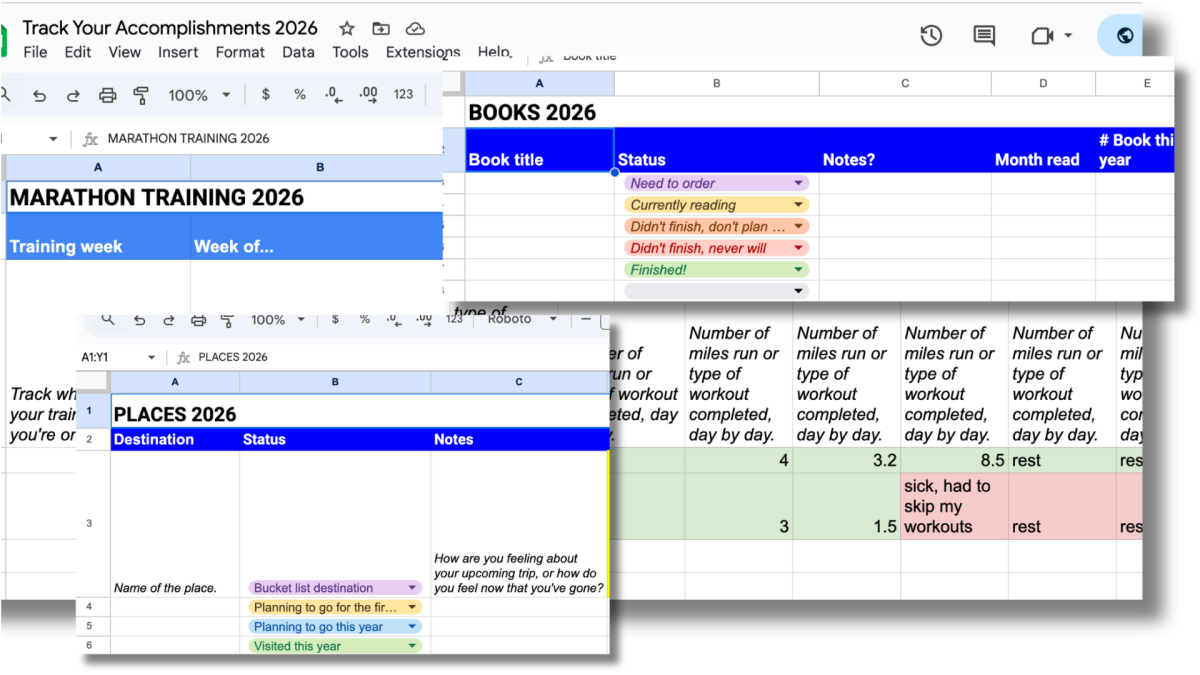
Beyond these three main tabs, I’ve also included even simpler activity trackers with the drop-down menus and color-coding I personally use to track my travel, books read, and running.
How to maximize your spreadsheet
You can dedicate a column in each tab for jotting down miscellaneous notes, but for the sake of tidiness, make sure not to overfill your boxes with text. It also helps to stay consistent with your formatting—e.g. bolding the header of each metric. I color code at whim. For instance, as a stand-up comedian, I keep track of all my shows with a specific color to mark how I felt about them: Shades of green mean the show went well, and shades of red mean the show…did not go well. In times where it looks like everything in my life is red, it’s nice to be able to shift my gaze to all the green, too. Perspective!
I recommend getting started with just one sheet: a weekly habit tracker for 3-4 habits you genuinely want to build. Commit to tracking honestly for four weeks without judgment. At the end of the month, review your completion rates and patterns. This low-stakes beginning helps you learn the rhythm without overwhelming yourself.
At the end of the year, you’ll be able to use all that data to visualize both the big and the little things in your life over the 12 months prior. At a glance, you’ll be able to pat yourself on the back for how successfully you cut back on caffeine, or upped your time outdoors, or improved your books-started to books-completed ratio. Ultimately, my own spreadsheet is about appreciating all the little things in my life, even if I do so in one of the nerdiest ways imaginable.
