

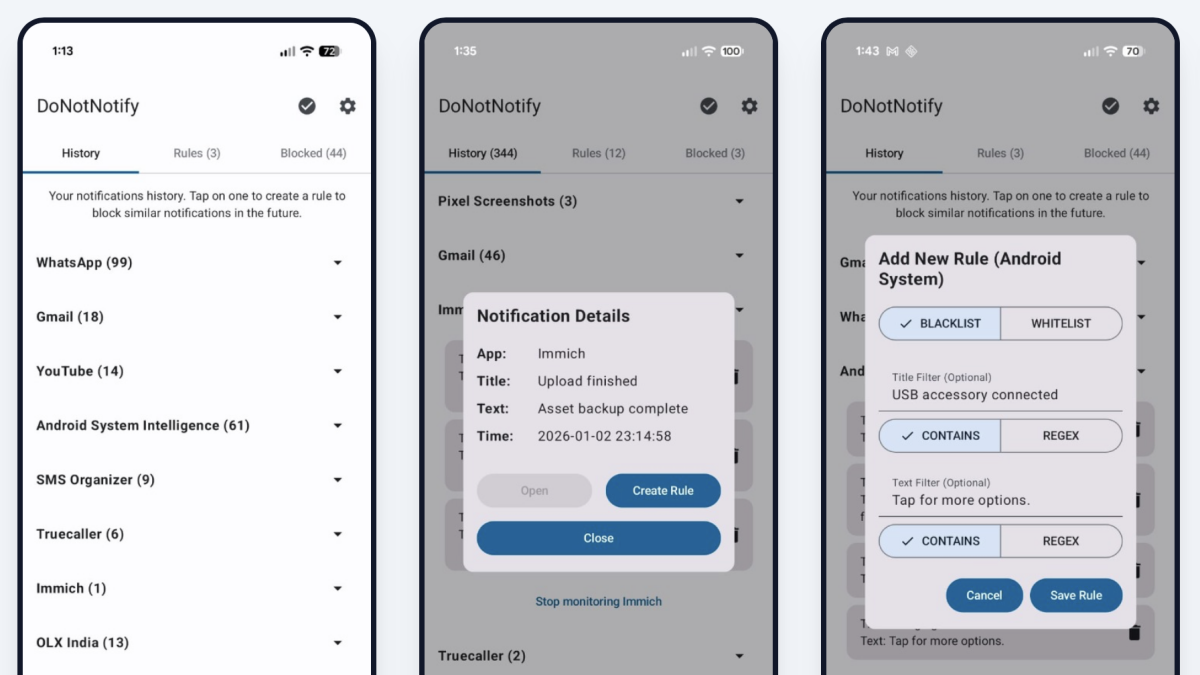
We all know how annoying unwanted notifications are, especially when you’re trying to focus. But turning notifications off entirely for a given app potentially means missing important messages. That’s where the free Android app DoNotNotify comes in—with it you can set up custom filters for notifications.
Maybe you’re in a group chat that is, for the most part, useful, but includes one person who talks too much. With this application, you could filter that person out, meaning you’d only get notifications when anyone else sends a message. You could also use this to filter news notifications about particular subjects or public figures you’d rather not see pop-ups about. You get the idea.
The application itself is deceptively simple. Launch it and you’ll need to give it permissions to access your notifications. Once you do, it will start collecting a log of notifications. You can tap any of these notifications in order to set up a rule.
The first thing you need to decide is whether you want to create a blacklist or a whitelist. You can add filters for the title of the notification (the bolded part at the top of the notification) or the text (which is the excerpt below the title).
The whitelist feature is great when you only want certain notifications from your apps. For example: Maybe your banking app sends out notifications about your credit score, which you want to see, but also promotions for other services, which you don’t. You could whitelist the words “credit score.” The same goes for news applications—maybe you only want to see headlines from a particular app when the headline mentions a certain country or public figure.
What do you think so far?
Blacklists, meanwhile, allow you to do the opposite. The group text example I gave earlier is an example of this. You could also use blacklists to prevent certain public figures or topics from showing up in notifications from news applications.
It’s worth noting that the application needs access to your notifications in order to filter them, meaning it could potentially gather a lot of information about you—concerns were raised about this on Hacker News. On the other hand, the app’s privacy policy is quite robust, claiming not to collect any information and not to work with any third parties.
I don’t think this is the kind of application every person is going to want—it’s for the obsessive. If that’s you, though, and you get annoyed by notifications often, you should give this a try.
