

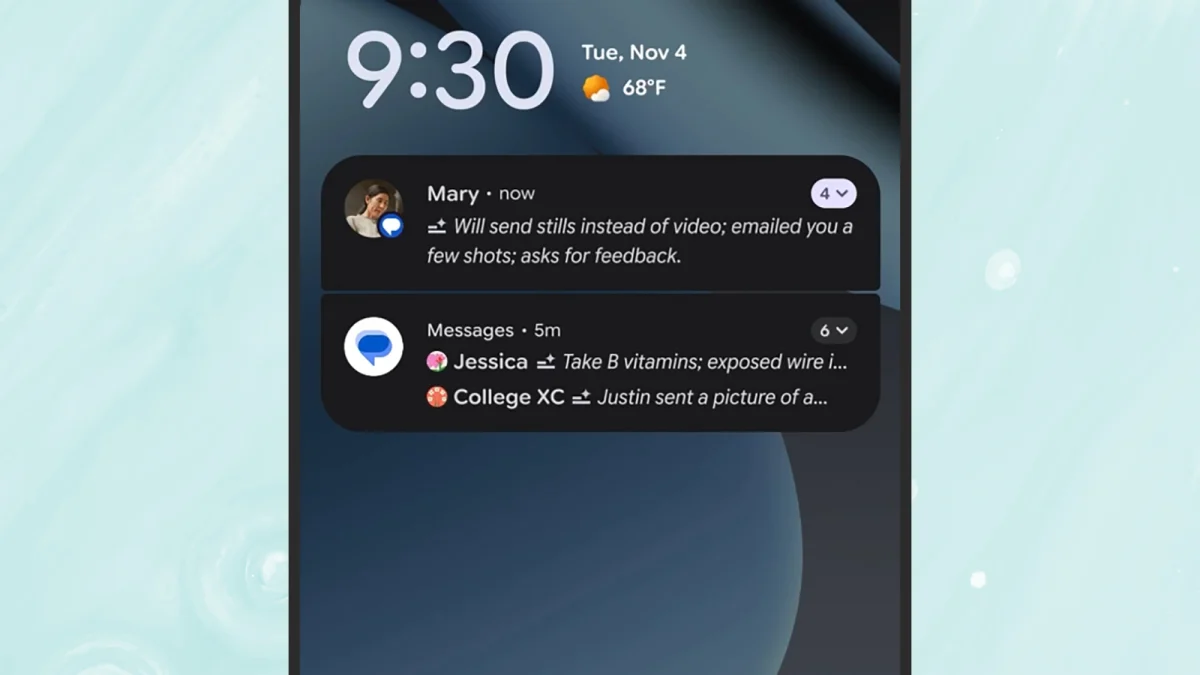
AI is everywhere! Writing essays, editing photos, producing social-media slop, doing your browsing for you, making plenty of mistakes—and now, if you’ve installed the latest Android 16 update (currently rolling out to Pixel phones), summarizing your notifications so you have less text and fewer alerts to wade through.
The new summarization feature, as per Google, will “help you cut through the clutter and stay focused,” and give you “quick understanding and context at a glance.” I’m all for cutting through the clutter, so as soon as the update landed on my own Pixel device, I decided to enable the feature and see how useful it really is.
How AI summaries work, and how to turn them on
Enabling the feature on an Android phone.
Credit: Lifehacker
AI notification summaries won’t automatically take over your phone, after the update—you need to enable them manually. From Settings, head to Notifications, then tap Notification summaries to turn this on. The same screen lets you choose which apps you want notifications summarized for.
There are actually two parts to the new update: the actual notification summaries, and what Google is calling a “notification organizer.” This organizer is designed to group and silence lower-priority notifications (including social alerts and promotional messages), though there doesn’t appear to be a separate toggle switch for this.
Of course, other Android phone makers will be able to implement this in whatever way they choose. It looks as though Samsung is testing the feature with the One UI 8.5, which should be launching in beta any day now. A full release of the software is expected early next year, alongside the Galaxy S26 phones.
Using AI notification summaries for 24 hours
Ready to banish notification clutter from my life, I turned on AI summaries for all my apps to see exactly how this worked. For a start, it doesn’t apply to all apps, at least not yet: My Snapchat and Instagram alerts remained the same as always, so further updates will be needed from Google and app developers before this is something you see everywhere.
The apps I saw summaries for most often were Google Chat, WhatsApp, and Slack—almost always in group conversations, and some of the time for single messages (the length of the message seems to affect this somehow). And the summaries were … mostly okay. They tended to catch the gist of who had said what, and in that sense were an accurate recap of what I was missing by not actually opening these apps.
The summaries work, up to a point.
Credit: Lifehacker
These summaries did update as more messages were added, but the summary preview window is only a couple of lines long—so once multiple people start piling into a group chat, the summary isn’t going to be able to cover everything. From the lock screen and pull-down notification shade, it’s possible to expand notifications to see full messages (as usual), and then minimize them back to the summary view again.
What do you think so far?
There was one occasion when the AI notification summaries got confused by the Lifehacker slack and by the various @mentions included—attributing a message to the person who had been tagged in a message, rather than the person who had sent it. On the whole, though, there were no obvious mistakes, just certain details left out from summaries of longer chats that I would’ve liked to have known about.
Now I’ve tested this out, I’m going to turn it off again, for a couple of reasons—and inaccuracy isn’t really one of them (though that might certainly creep in). First, given the small size of the preview window, I’m not sure an AI summary is any more useful than the first couple of lines of text you get as standard anyway. That’s usually enough for me to tell whether or not a message is important before opening it.
This Slack summary wasn’t fully accurate—and Snapchat alerts weren’t affected.
Credit: Lifehacker
Second, I’m not sure I really want my messages and group chats summarized—at least not the important ones. If a friend, family member, or work colleague has something to tell me, I’d like to know exactly what it is, rather than reading a précis. It feels like AI is being used just for the sake of it—and not for the first time.
I didn’t see any evidence of the notification organizer in action, by the way, perhaps because of the way I’ve got my Android notifications set up—there are now a host of granular options for alerts in Android, for silencing and dismissing notifications. This feature sounds vaguely useful, but again, I’m not sure I’m ready to hand over the job of judging how important notifications are over to AI just yet.
